
VIRTUAL
Privacy Policy
Informativa sui Cookie
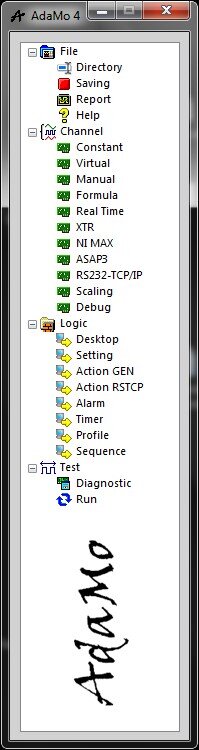
By selecting "Virtual" you can enter a sub-area where it’s possible to create virtual channels; some "Virtual Cards" are available to be considered as groups of channels of definable number without limit.
Input channels are used to simulate dynamic acquisitions.
The output channels are used as variables or as temporary allocations of memory in which to write the numeric values to be used in other moments or portions of the program.
Typical uses:
- Storage of intermediate states, for example partial ratings, with which then do a calculation or a final assessment
- storing values in different times for evaluations of differences or trends
As all logical channels of "output" type, their value can be changed:
- by action or profile (i.e. automation)
- by connecting to another logical channel
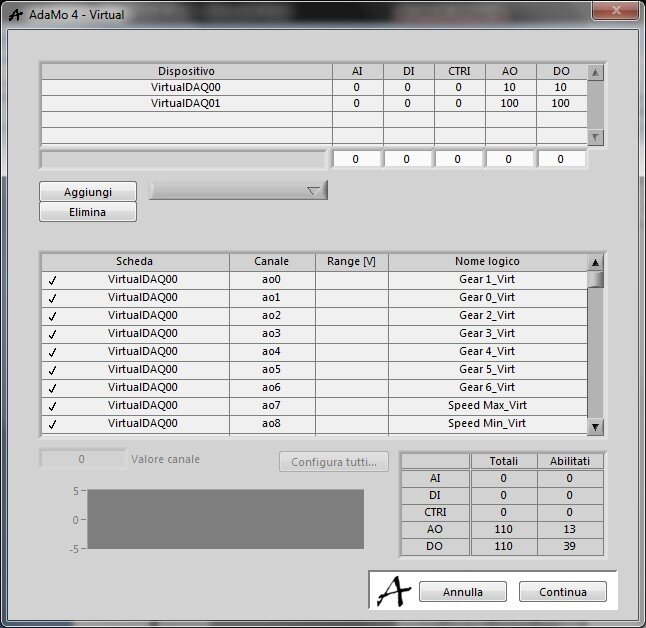
In this picture you can see the management settings.
As in most of channels’ sources, is available a feature to preview the value of the selected channel ("single channel oscilloscope") if it’s of the input type or to give it an active value if it’s of the output type.
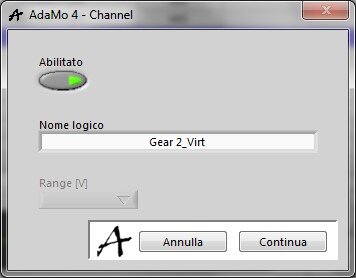
In this picture you can see the details for each virtual channel.
Privacy Policy
Informativa sui Cookie